Custom Disc Maestro
A NeoForge mod that turns making music discs into a small, hands-on manufacturing pipeline — the way real vinyl is made (well, almost). Compose a tune, cut it to a master, electroform a pressing matrix in a poisonous green bath, stamp your own records, dye the artwork, and sleeve the finished release. Discs wear out as they play — and you can deliberately distress them, too.
All audio plays through Minecraft's own note-block sounds — no external audio mods, no file uploads, fully multiplayer-safe and positional.
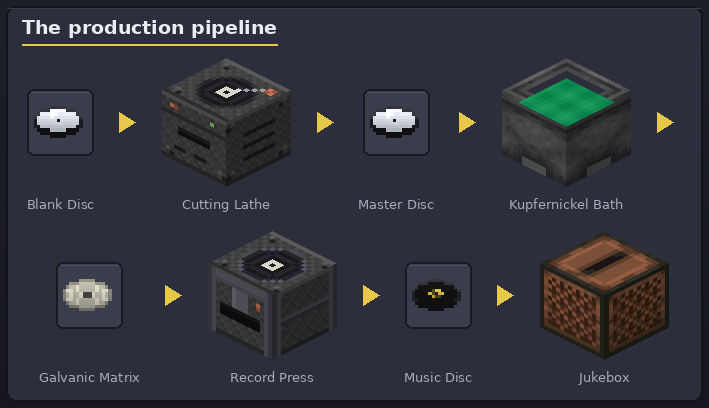
Note
Images in this guide are rendered from the mod's actual textures by
docs/tools/render_images.py.
Features
- In-game piano-roll sequencer (16 note-block instruments, free BPM 40–300, drag-painting) plus
Note Block Studio (
.nbs) import. - A real production chain: master → galvanic matrix → pressed record, each step at its own station.
- Dyeable records: vinyl colour, label colour and a stamped label pattern.
- Wear & tear: each jukebox play wears the groove; at 50% / 75% / 100% wear discs skip notes, detune and finally play heavily distorted with a shattered look. A worn master passes its damage down to every copy. Wear budgets are server-configurable.
- Deliberate scratching at the smithing table to age a record on purpose.
- Record sleeves with dyed album-cover artwork, a record visibly peeking out, and reusable stencils for mass-producing matching covers.
- Plays positionally in multiplayer through the vanilla jukebox, with "Now Playing" metadata.
Progression guide
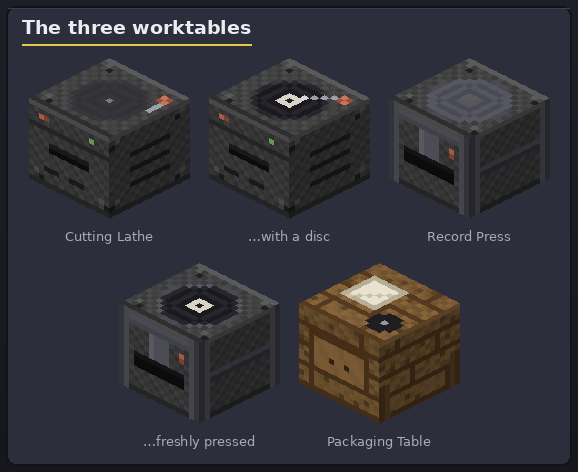
1. Build the three worktables
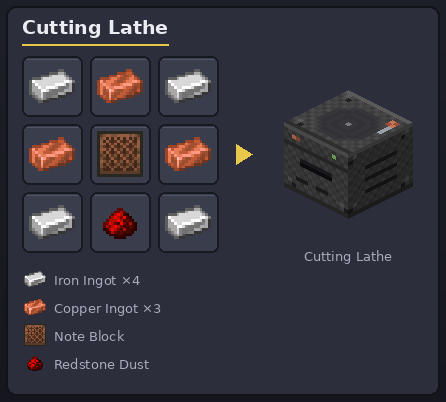
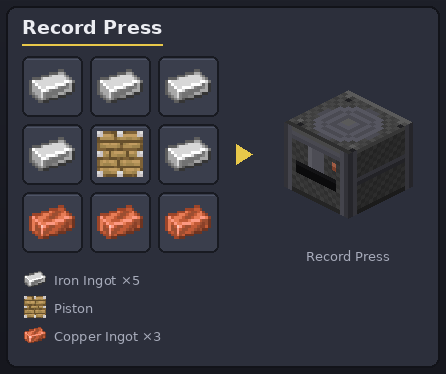
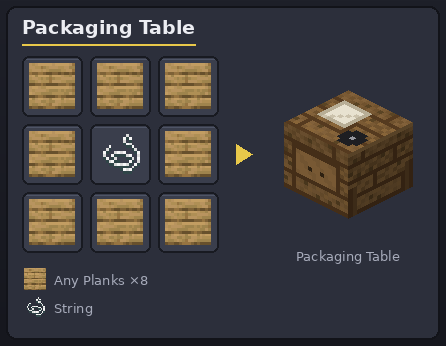
The lathe and the press show the disc lying on top while one is inside.
2. Craft a Blank Disc
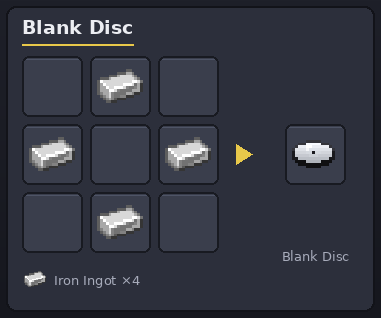
Four iron ingots in a ring make one Blank Disc — the raw master you will record onto.
3. Compose and cut a master
Right-click the Cutting Lathe to open the editor:
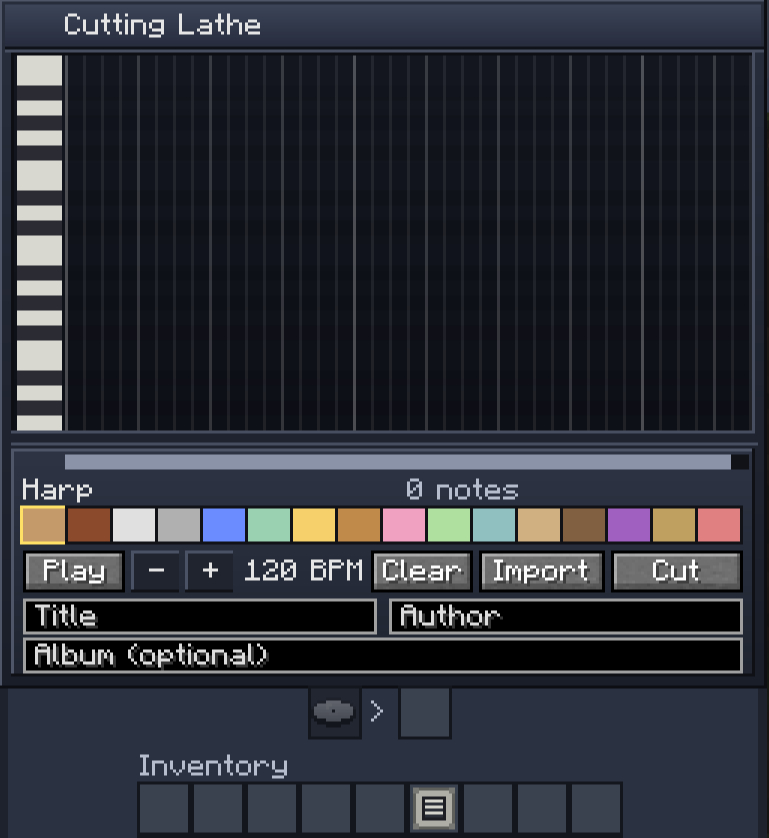
- The grid is a piano roll: columns are time steps, rows are pitch (piano keys on the left). Click to place a note, click again to remove it, drag to paint lines of notes.
- Pick one of 16 instruments from the colour palette (each has its own colour on the roll).
- Set the BPM (40–300, hold the −/+ buttons to scroll fast), audition with Play, and fill in Title / Author / Album — they will show on the disc's tooltip and in "Now Playing".
- Import reads a Note Block Studio
.nbsfile (up to 8192 notes / 20 minutes; custom NBS instruments are mapped to the closest vanilla ones). - Put your Blank Disc into the input slot and hit Cut — the lathe cuts the melody onto a master disc (tagged Master in the tooltip).
The master is playable right away — but every play wears it, and copies inherit that wear, so press your run before you spin it too much!
4. Brew the kupfernickel bath
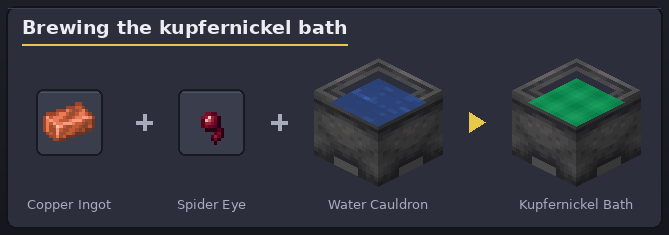
Throw (press Q) a copper ingot and a spider eye into a water-filled cauldron. It fizzes and turns into an emerald-green Kupfernickel Bath. You can scoop it with a bucket, pour it back, even place it in the world — but don't swim in it: it inflicts Wither.
5. Electroform the Galvanic Matrix
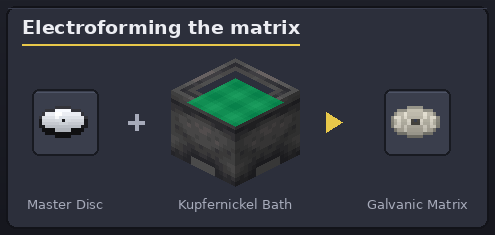
Right-click the bath cauldron with your master disc. The bath grows a Galvanic Matrix — a metal negative of your track. The master is returned to you; the bath level drops by one. One matrix stamps 3 records before it wears out (admin-configurable). If the master was already worn, the matrix bakes that wear in — every record it stamps starts pre-worn (that's authentic!).
Only master discs electroform; a pressed record can't be turned back into a matrix.
6. Press your records
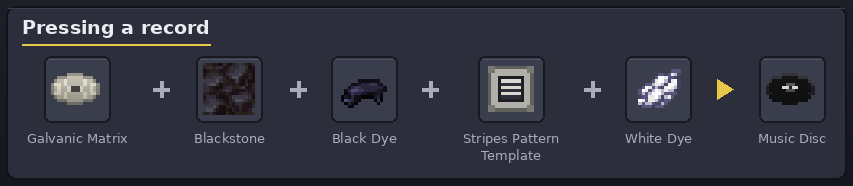
Open the Record Press and load:
| Slot | Item | Required? |
|---|---|---|
| Matrix | your Galvanic Matrix | yes |
| Blackstone | 1 per record (the vinyl stock) | yes |
| Disc dye | any dye — colours the disc body | optional (default: black) |
| Pattern | a pattern template (stripes / ribbon / dots) | optional (default: plain) |
| Label dye | any dye — colours the label/pattern | optional (default: white) |
Hit Press: dyes and template are consumed, the matrix loses one use, and a finished record pops into the output (you'll see it lying on the platen). The live preview shows exactly what you'll get.
7. Play it — and mind the wear
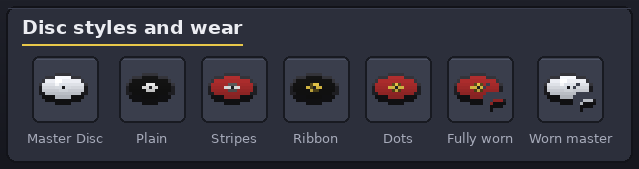
Any vanilla jukebox plays your records, positionally, for everyone nearby. Each play costs one point of the disc's wear budget (32 plays by default for both masters and pressed records — admins can change it, see Server configuration). Distortion kicks in by percentage of wear, whatever the budget:
- below 50% — pristine sound;
- 50%+ — occasional skipped notes and slight detune;
- 75%+ — more skips, stronger detune;
- 100% — fully worn: heavy distortion, and the disc shows a shattered texture (its colours and pattern stay visible on the pieces).
Want that aged sound on purpose? Scratch the record at a smithing table: flint + record +
flint ages it to the next stage (50% → 75% → 100%).
8. Sleeve the release
-
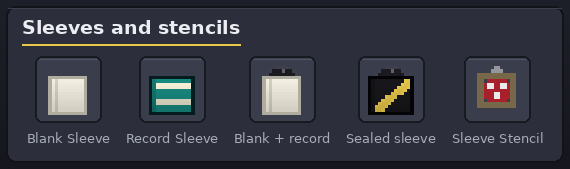
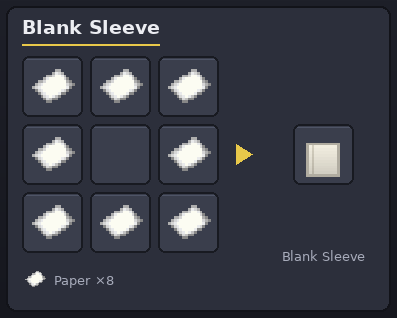
Craft a Blank Sleeve from 8 paper arranged in a ring.
-
Design it at the Packaging Table: cover dye + pattern template + sticker dye + a title, with a live preview. Apply consumes the materials.
- Putting a record in: pick the sleeve up on your cursor and right-click it onto a record (or right-click a record onto the sleeve). Taking it out: right-click the filled sleeve onto an empty slot. Using a filled sleeve in hand tosses the record onto the ground. The disc edge visibly peeks out of a filled sleeve. (The crafting grid works too: sleeve + disc combines, a filled sleeve splits back apart.)
- A sleeve with a record inside is sealed — its design is locked until you take the record out.
- Mass-produce artwork: bake a designed sleeve into a reusable Stencil (the sleeve is
consumed), then craft
stencil + N blank sleeves→ N designed sleeves; the stencil is returned every time.
Where do pattern templates come from?
When a skeleton kills another skeleton, the victim always drops a random pattern template
(stripes, ribbon or dots). Set up a duel or get creative. Duplicate any template with
template + diamond → 2 templates.
Server configuration
Admins can tune the pipeline in the server config — config/cdm-server.toml on a dedicated server,
<world>/serverconfig/cdm-server.toml in singleplayer (also editable from the in-game mod config
screen). Values apply to items created after the change; existing discs keep the budget they
were made with. Sound distortion always starts at 50% / 75% / 100% of the configured wear.
| Setting | Default | Meaning |
|---|---|---|
uses.masterUses |
32 | Jukebox plays a freshly cut master disc survives |
uses.recordUses |
32 | Jukebox plays a pressed record survives |
uses.matrixUses |
3 | Records one galvanic matrix can press |
Installation
- Install NeoForge for your Minecraft version.
- Drop the mod JAR into your
mods/folder — pick the build matching your Minecraft version on the Releases page (each supported Minecraft version lives on its own branch). - Launch the game.
Development builds are available from the Actions artifacts.